
Continuo
Continuo is an endless solo piano generator that runs entirely in the browser. It has controls for mood, energy, tempo, density, touch, complexity, register, and playing texture. The intended use is game music, so those controls can change while the piano is playing instead of selecting a different prerecorded track.
I built it with Codex. Codex wrote most of the code while I set the direction, listened to the output, and said what sounded wrong. The useful feedback was usually specific: "that note was weird," "that transition didn't sound human," or "the keys are being struck too hard." Turning those complaints into code was most of the project.
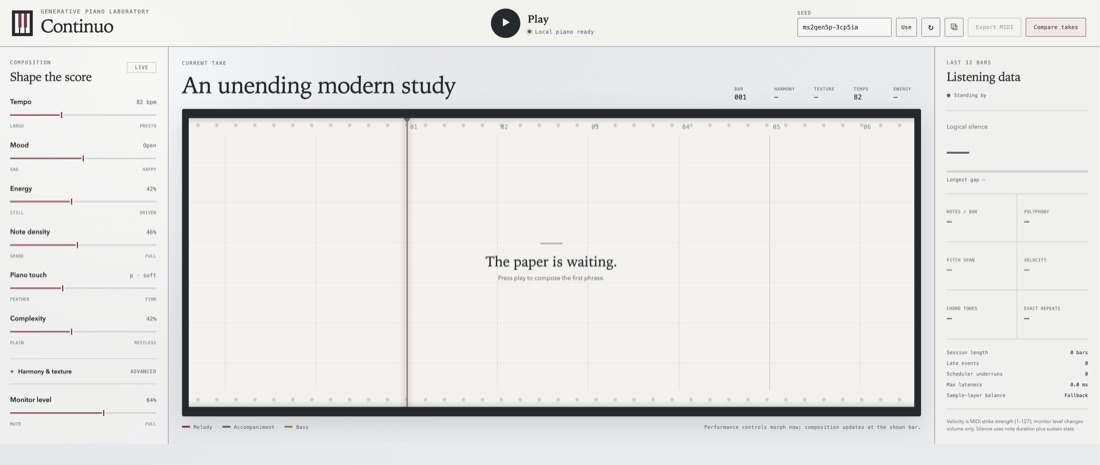
The app has two parts. generative-piano is a TypeScript library for composition, performance, playback, analysis, blind comparisons, and MIDI export. The React playground is where I listen, move controls, watch the piano roll, and see measurements from the last 32 bars. There is no backend or account. After the samples load, playback makes no network requests.
where the music comes from
The browser uses sampled piano notes, but it generates the score locally. It ships with four measured velocity layers from the public-domain Splendid Grand Piano sample set: PP, MP, MF, and FF. Those recordings provide the sound of an individual key at different strike strengths. Continuo decides which pitches happen, when they happen, how long they last, and how hard the virtual pianist strikes them.
Composition starts with a long-form planner. It maps the session onto a 64-bar A, A', B, A movement and gives each four-bar phrase a job: establish an idea, vary it, build tension, reach a cadence, or recall something from earlier. The form is simple on purpose. Without it, the generator can make an unlimited supply of acceptable four-bar loops that never seem to be going anywhere.
For each phrase, the score generator writes ten alternatives. A scorer ranks them for harmonic clarity, melodic continuity, motif coherence, rhythmic shape, playability, fit to the current controls, and novelty relative to the previous phrase. Motif coherence has the largest weight at 20%. Harmonic clarity and melodic continuity are 18% each. Generating ten turns composition into a cheap search problem. A random generator may make one awkward decision; ten candidates give the scorer a chance to reject it.
The chosen score still has no MIDI velocity, pedal, microtiming, or tempo curve. A separate performance renderer adds those. Melody notes sit above accompaniment in the dynamic balance. Repeated pitches soften. Cadences slow down and lengthen. The two hands land a few ticks apart. Pedal changes follow the harmony instead of staying down across every chord.
Separating composition from performance fixed several problems that looked like bad writing but were really bad playing. The same notes sound different when every onset is on the grid and every voice has the same weight. It also means a learned composer or performance model could replace either half later without replacing the session planner, browser player, analysis code, or MIDI exporter.
making the controls react
The first version accepted live settings, but "live" was generous. The generator planned ahead in phrases. I could move the energy slider, wait, and fail to hear a change because several seconds of the old state were already queued. If a game enters a fight, its musical state needs to change within a bar.
The player now treats the same change at two levels. Tempo and piano touch affect newly scheduled notes inside a 320 millisecond response window. Energy retargets timing, duration, and velocity in that window. Density can remove notes from the old phrase, and register can transpose them. Then mood, energy, density, complexity, key, mode, register, and texture get a full rewrite at the next bar. Rapid slider updates are coalesced, so dragging a control does not generate a pile of obsolete transitions. The playground displays the exact bar where the replacement will begin.
This made energy reveal a second problem. Higher energy raised MIDI velocity, and the piano began to sound as if someone was hitting it. I had originally mixed strike strength with listening volume. They are now separate controls. Piano touch changes MIDI velocity and therefore sample-layer selection. Monitor level only changes output gain. Turning the speakers down no longer makes the player gentler, and asking for more energy does not require listening at a higher volume.
one bad note
The failure I kept noticing was a phrase that sounded plausible until one note or transition did not. The note would usually be legal. It was in the scale, inside the hand's range, and close enough to the chord to survive basic validation. I still did not like it.
Some of the fixes were conventional music rules. Strong beats favor chord tones. Voice-leading penalizes large jumps. The left and right hands have separate ranges, and a candidate loses 18% of its playability score for each crossing. Motifs return with transformations instead of disappearing after one phrase. Cadences get a small bonus for resolving clearly.
The less conventional fix was the blind comparison room. It makes two takes with the same seed, settings, duration, and sampled piano. One uses the reference engine and one uses the newer score and performance pipeline. Their identities and metrics stay hidden until I vote. This catches a common failure mode in generative work: knowing which version contains the new code and then hearing what I expected to hear.
The comparison tool is better at preference than diagnosis. It can replay either take from the beginning, but it cannot yet rewind a few seconds and mark the exact note that bothered me. That is the next useful feature. "B was better" is evaluation data. "Bar 11, second beat, the melody jumped to that F-sharp and the next chord did not justify it" is debugging data.
measuring what can be measured
The automated harness generates 3,072 phrases on every full check: eight scenarios, twelve fixed seeds, and 32 phrases per run. The scenarios include calm and intense versions of sad and happy, minimum density, maximum density and complexity, and a transition from sad to happy halfway through.
Each run measures logical silence, longest empty gap, notes per bar, polyphony, pitch and velocity distributions, large melody leaps, hand crossings, dissonant simultaneous notes, chord tones on strong beats, exact bar repeats, motif reuse, and mean voice-leading movement. The guardrails reject a stream if any phrase is empty, a note leaves the piano's MIDI range of 21 through 108, velocity leaves 1 through 127, silence exceeds 60%, one silent gap lasts more than four bars, polyphony exceeds 32 notes, or the sustain pedal is left down at the end.
There are also directional checks for the controls. In the current benchmark, moving from sparse to dense settings raises the average from 6.73 to 15.75 notes per bar. Calm settings average MIDI velocity 54.3; intense settings average 92.3. The sad scenarios choose bright modes for 0% of phrases and the happy scenarios choose them for 100%. These numbers only verify that the sliders cause the intended kind of change.
This harness started with silence because silence is easy to define and easy to break. Sad music kept becoming empty music. Fixing it by adding notes everywhere would have made density meaningless, so silence had to be measured across the full control grid. The same pattern repeated with velocity and large leaps: a local fix could improve the phrase I was listening to while making another corner of the settings worse.
The benchmark still approves music I dislike. It can catch a four-bar hole, an impossible hand crossing, or an energy slider that does nothing. It cannot explain why a valid transition sounds as though the pianist forgot what came before. That part still needs listening.
The playground is available at dzoba.github.io/generative-piano-gpt.